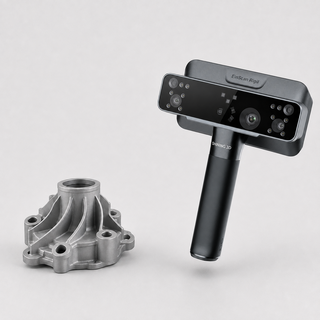
 9,5
9,5
 3D Printers
 3D Scanners
 Laser Machines
 Print & Transfer
 Acrylic Sheets
 Outlet
 Training
 Leasing
 Servicerobots
Professional 3D Scanners for Objects, Reverse Engineering and 3D Printing
Buy a 3D Scanner at FilRight
Do you want to accurately digitise an object, part, person or shape? With a 3D scanner, you can quickly create a digital 3D model of a physical object. This model can be used for reverse engineering, 3D printing, quality control, product development, design, restoration, education or digital archiving.
At FilRight, you will find professional 3D scanners from Shining 3D and EinScan. These scanners are suitable for a wide range of applications: from compact desktop scanners for smaller objects to wireless all-in-one scanners, handheld 3D scanners and metrology solutions for technical applications.
The best 3D scanner depends on what you want to scan. Consider object size, required accuracy, colour capture, mobility, software, workflow and the purpose of the scan. FilRight is happy to help you choose the right 3D scanner for your application.
What Is a 3D Scanner Used For?
A 3D scanner is used to digitally capture the shape of a physical object. The scanner creates a point cloud or mesh, which can be converted into a digital 3D model. Depending on the scanner and software, this model can be used for design, production, inspection or further processing in CAD software.
Common applications include:
- Reverse engineering
- 3D printing
- Product development
- Quality control and inspection
- Metrology
- Art and cultural heritage
- Education and research
- Medical and orthopaedic applications
- Automotive and mechanical engineering
- Digital archiving
- Custom products and personalisation
A simple object scan requires a different scanner than high-accuracy technical inspection. That is why it is important to define your goal before choosing a scanner.
Which 3D Scanner Fits Your Application?
Desktop 3D Scanners
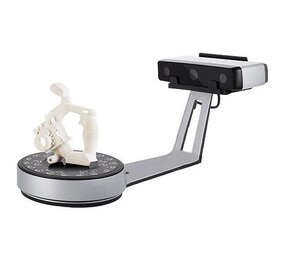
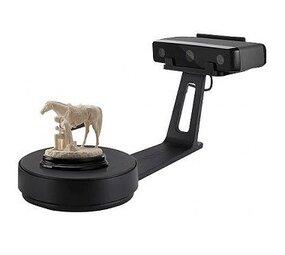
Desktop 3D scanners are suitable for small to medium-sized objects. They are often used in education, product development, design studios, makerspaces and laboratories. With a fixed setup or turntable, the workflow is clear and repeatable.
Desktop scanners are interesting when you want to digitise objects accurately without a lot of manual scanning. They are suitable for prototypes, small parts, models, art objects, educational projects and 3D printing applications.
Handheld 3D Scanners
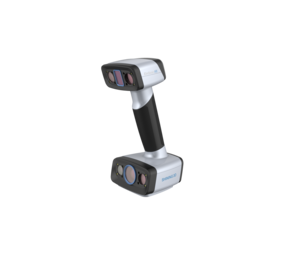
Handheld 3D scanners are portable and flexible. You move the scanner around the object, making it possible to scan larger or hard-to-move objects. This makes handheld scanners suitable for automotive, mechanical engineering, design, ergonomics, art, restoration and product development.
A handheld scanner is a good choice when you need to scan different object sizes or when the object does not easily fit on a turntable.
Wireless All-in-One 3D Scanners
Wireless all-in-one scanners combine scanner, screen, computing power and storage in one device. This allows you to scan without a fixed PC setup. This is useful on location, in workshops, showrooms, laboratories, educational environments and situations where mobility is important.
All-in-one scanners are interesting for users who want to start quickly, work flexibly and rely less on cables or external hardware.
3D Scanners for Reverse Engineering
For reverse engineering, you scan a physical part to digitally reconstruct, modify or redesign it. This is useful when no CAD file is available, when an existing part needs to be adapted or when parts need to be reproduced, improved or checked.
For reverse engineering, accuracy, detail level, scan stability and good software integration are important. The scan is often combined with CAD software to convert mesh data into usable design data.
3D Scanners for Inspection and Metrology
For quality control, inspection and metrology, accuracy and repeatability are especially important. In these applications, a 3D scanner is used to measure deviations, compare parts with CAD data or monitor production processes.
Metrology-oriented scanners are widely used in engineering, mechanical engineering, automotive, aerospace, product development and production environments.
Shining 3D and EinScan Scanners
Shining 3D is a well-known manufacturer of 3D scanners for different user levels and applications. The range includes EinScan scanners for professional and creative applications, EinStar scanners for accessible 3D scanning and FreeScan scanners for metrology and industrial applications.
EinStar and EinScan for Accessible 3D Scanning
For users who want to start with 3D scanning or need a user-friendly scanner, EinStar and certain EinScan models are interesting. These scanners are suitable for education, makerspaces, design, prototyping, digital models and 3D printing.
EinScan Handheld Scanners for Professional Use
EinScan handheld scanners are suitable for users who need more flexibility, accuracy and application options. Think of designers, engineers, product developers, technical departments, restorers and companies that regularly digitise objects or parts.
FreeScan for Industrial Applications
FreeScan scanners are focused on professional and industrial applications where accuracy, reliability and inspection capabilities matter. These scanners are interesting for quality control, metrology, reverse engineering and technical production environments.
3D Scanner for 3D Printing
A 3D scanner is a valuable addition to a 3D printer. You can scan an existing object, digitally edit it and then 3D print it again. This is often used for prototypes, custom parts, repairs, art objects, educational projects and product development.
Keep in mind that a 3D scan is not always immediately ready for printing. The model often needs to be cleaned, closed, scaled or edited in software. FilRight can advise you on the right combination of scanner, software and 3D printer.
Choosing a 3D Scanner: What Should You Consider?
When choosing a 3D scanner, several factors are important. The best choice depends on your application, object type and desired workflow.
Consider:
- Object size
- Required accuracy
- Detail level
- Colour and texture capture
- Scanning with or without markers
- Desktop, handheld or wireless use
- Software and export formats
- CAD software integration
- Use for 3D printing or inspection
- User experience level
- Budget and future use
If you are unsure between several models, a demonstration or consultation is often the best way to make the right choice.
Buy a 3D Scanner with Advice from FilRight
A 3D scanner should not be selected based on specifications alone. The right scanner depends on your objects, application, software, required accuracy and preferred way of working. That is why FilRight is happy to help with personal advice.
At FilRight, you benefit from:
- Professional 3D scanners from Shining 3D and EinScan
- Advice on scanner, software and application
- Showroom in IJsselstein, the Netherlands
- Demonstration possibilities
- Support with 3D scanning, 3D printing and workflow
- Solutions for education, design, engineering and production
- 3D printers, scanners, filament and accessories in one place
Would you like to know which 3D scanner best fits your application? Contact FilRight or schedule a demonstration in our showroom.
Frequently Asked Questions About 3D Scanners
Which 3D scanner do I need?
That depends on what you want to scan. For small objects, a desktop scanner is often suitable. For larger objects or more flexible use, a handheld scanner is more logical. For inspection and metrology, choose a scanner with higher accuracy and professional software options.
Can I use a 3D scan for 3D printing?
Yes, you can. The scan file often needs to be cleaned or edited before it is suitable for printing. A good workflow consists of scanning, editing, checking and then 3D printing.
What is the difference between a desktop scanner and a handheld scanner?
A desktop scanner usually works with a fixed setup or turntable and is suitable for smaller objects. A handheld scanner is moved around the object and is more flexible for larger or hard-to-move objects.
Can a 3D scanner capture colour?
Many 3D scanners can capture colour or texture, but this differs per model. For applications such as art, heritage, visualisation and presentation, colour capture can be important.
Do I need markers for 3D scanning?
Some scanners and scan modes use markers to track objects accurately. Other scanners can also scan without markers, depending on the object, material, surface and selected scan mode.
Is a 3D scanner suitable for reverse engineering?
Yes, many professional 3D scanners are used for reverse engineering. The scan result is then used as a basis for CAD modelling, design modifications or part reproduction.
Can FilRight help with a demonstration?
Yes, FilRight can advise you on 3D scanners and discuss the possibilities for a demonstration in the showroom in IJsselstein.
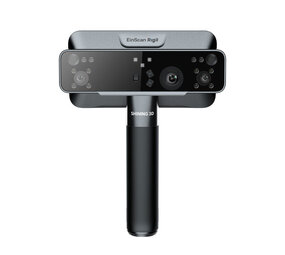
The Shining3D EinScan Rigil is the...
The Shining3D EinScan R...
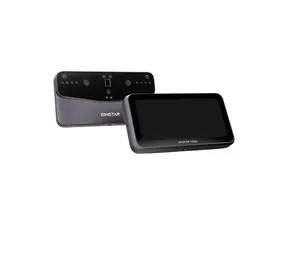
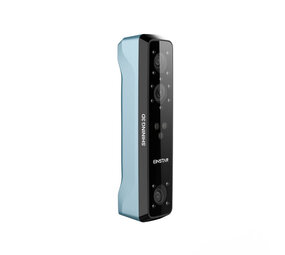
Introducing the VEGA by Einstar, t...
Introducing the VEGA by...
- Snelle levertijden
- Gratis verzending vanaf € 100!
- Showroom in IJsselstein!
Overige categorieën in 3D Scanners
Professional 3D Scanners for Objects, Reverse Engineering and 3D Printing
Buy a 3D Scanner at FilRight
Do you want to accurately digitise an object, part, person or shape? With a 3D scanner, you can quickly create a digital 3D model of a physical object. This model can be used for reverse engineering, 3D printing, quality control, product development, design, restoration, education or digital archiving.
At FilRight, you will find professional 3D scanners from Shining 3D and EinScan. These scanners are suitable for a wide range of applications: from compact desktop scanners for smaller objects to wireless all-in-one scanners, handheld 3D scanners and metrology solutions for technical applications.
The best 3D scanner depends on what you want to scan. Consider object size, required accuracy, colour capture, mobility, software, workflow and the purpose of the scan. FilRight is happy to help you choose the right 3D scanner for your application.
What Is a 3D Scanner Used For?
A 3D scanner is used to digitally capture the shape of a physical object. The scanner creates a point cloud or mesh, which can be converted into a digital 3D model. Depending on the scanner and software, this model can be used for design, production, inspection or further processing in CAD software.
Common applications include:
- Reverse engineering
- 3D printing
- Product development
- Quality control and inspection
- Metrology
- Art and cultural heritage
- Education and research
- Medical and orthopaedic applications
- Automotive and mechanical engineering
- Digital archiving
- Custom products and personalisation
A simple object scan requires a different scanner than high-accuracy technical inspection. That is why it is important to define your goal before choosing a scanner.
Which 3D Scanner Fits Your Application?
Desktop 3D Scanners
Desktop 3D scanners are suitable for small to medium-sized objects. They are often used in education, product development, design studios, makerspaces and laboratories. With a fixed setup or turntable, the workflow is clear and repeatable.
Desktop scanners are interesting when you want to digitise objects accurately without a lot of manual scanning. They are suitable for prototypes, small parts, models, art objects, educational projects and 3D printing applications.
Handheld 3D Scanners
Handheld 3D scanners are portable and flexible. You move the scanner around the object, making it possible to scan larger or hard-to-move objects. This makes handheld scanners suitable for automotive, mechanical engineering, design, ergonomics, art, restoration and product development.
A handheld scanner is a good choice when you need to scan different object sizes or when the object does not easily fit on a turntable.
Wireless All-in-One 3D Scanners
Wireless all-in-one scanners combine scanner, screen, computing power and storage in one device. This allows you to scan without a fixed PC setup. This is useful on location, in workshops, showrooms, laboratories, educational environments and situations where mobility is important.
All-in-one scanners are interesting for users who want to start quickly, work flexibly and rely less on cables or external hardware.
3D Scanners for Reverse Engineering
For reverse engineering, you scan a physical part to digitally reconstruct, modify or redesign it. This is useful when no CAD file is available, when an existing part needs to be adapted or when parts need to be reproduced, improved or checked.
For reverse engineering, accuracy, detail level, scan stability and good software integration are important. The scan is often combined with CAD software to convert mesh data into usable design data.
3D Scanners for Inspection and Metrology
For quality control, inspection and metrology, accuracy and repeatability are especially important. In these applications, a 3D scanner is used to measure deviations, compare parts with CAD data or monitor production processes.
Metrology-oriented scanners are widely used in engineering, mechanical engineering, automotive, aerospace, product development and production environments.
Shining 3D and EinScan Scanners
Shining 3D is a well-known manufacturer of 3D scanners for different user levels and applications. The range includes EinScan scanners for professional and creative applications, EinStar scanners for accessible 3D scanning and FreeScan scanners for metrology and industrial applications.
EinStar and EinScan for Accessible 3D Scanning
For users who want to start with 3D scanning or need a user-friendly scanner, EinStar and certain EinScan models are interesting. These scanners are suitable for education, makerspaces, design, prototyping, digital models and 3D printing.
EinScan Handheld Scanners for Professional Use
EinScan handheld scanners are suitable for users who need more flexibility, accuracy and application options. Think of designers, engineers, product developers, technical departments, restorers and companies that regularly digitise objects or parts.
FreeScan for Industrial Applications
FreeScan scanners are focused on professional and industrial applications where accuracy, reliability and inspection capabilities matter. These scanners are interesting for quality control, metrology, reverse engineering and technical production environments.
3D Scanner for 3D Printing
A 3D scanner is a valuable addition to a 3D printer. You can scan an existing object, digitally edit it and then 3D print it again. This is often used for prototypes, custom parts, repairs, art objects, educational projects and product development.
Keep in mind that a 3D scan is not always immediately ready for printing. The model often needs to be cleaned, closed, scaled or edited in software. FilRight can advise you on the right combination of scanner, software and 3D printer.
Choosing a 3D Scanner: What Should You Consider?
When choosing a 3D scanner, several factors are important. The best choice depends on your application, object type and desired workflow.
Consider:
- Object size
- Required accuracy
- Detail level
- Colour and texture capture
- Scanning with or without markers
- Desktop, handheld or wireless use
- Software and export formats
- CAD software integration
- Use for 3D printing or inspection
- User experience level
- Budget and future use
If you are unsure between several models, a demonstration or consultation is often the best way to make the right choice.
Buy a 3D Scanner with Advice from FilRight
A 3D scanner should not be selected based on specifications alone. The right scanner depends on your objects, application, software, required accuracy and preferred way of working. That is why FilRight is happy to help with personal advice.
At FilRight, you benefit from:
- Professional 3D scanners from Shining 3D and EinScan
- Advice on scanner, software and application
- Showroom in IJsselstein, the Netherlands
- Demonstration possibilities
- Support with 3D scanning, 3D printing and workflow
- Solutions for education, design, engineering and production
- 3D printers, scanners, filament and accessories in one place
Would you like to know which 3D scanner best fits your application? Contact FilRight or schedule a demonstration in our showroom.
Frequently Asked Questions About 3D Scanners
Which 3D scanner do I need?
That depends on what you want to scan. For small objects, a desktop scanner is often suitable. For larger objects or more flexible use, a handheld scanner is more logical. For inspection and metrology, choose a scanner with higher accuracy and professional software options.
Can I use a 3D scan for 3D printing?
Yes, you can. The scan file often needs to be cleaned or edited before it is suitable for printing. A good workflow consists of scanning, editing, checking and then 3D printing.
What is the difference between a desktop scanner and a handheld scanner?
A desktop scanner usually works with a fixed setup or turntable and is suitable for smaller objects. A handheld scanner is moved around the object and is more flexible for larger or hard-to-move objects.
Can a 3D scanner capture colour?
Many 3D scanners can capture colour or texture, but this differs per model. For applications such as art, heritage, visualisation and presentation, colour capture can be important.
Do I need markers for 3D scanning?
Some scanners and scan modes use markers to track objects accurately. Other scanners can also scan without markers, depending on the object, material, surface and selected scan mode.
Is a 3D scanner suitable for reverse engineering?
Yes, many professional 3D scanners are used for reverse engineering. The scan result is then used as a basis for CAD modelling, design modifications or part reproduction.
Can FilRight help with a demonstration?
Yes, FilRight can advise you on 3D scanners and discuss the possibilities for a demonstration in the showroom in IJsselstein.