 9,5

 3D Printers
 3D Scanners
 Laser Machines
 Print & Transfer
 Acrylic Sheets
 Outlet
 Training
 Leasing
 Servicerobots
DTF Printers for Professional Clothing Printing
DTF Printers for Professional Garment Printing and Textile Personalization
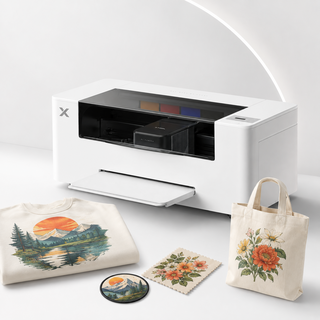
With a DTF printer, you can produce professional full-color transfers for T-shirts, hoodies, sweatshirts, workwear and other textile products. DTF stands for Direct to Film, a printing process in which a design is printed onto special transfer film before being applied to fabric using a heat press.
DTF printing is particularly interesting for creative businesses, clothing brands, print shops and companies looking to personalize apparel and merchandise in-house. You can produce individual products, small batches and personalized orders on demand.
At FilRight, you can explore the xTool Apparel Printer Plus and various DTF printer bundles, as well as the xTool Automatic Shaker Oven Machine. Together, these products provide a workflow for printing, powder application, curing and heat pressing DTF transfers.
What Is DTF Printing and How Does It Work?
DTF printing is a transfer-based method for decorating textiles. Unlike DTG (Direct to Garment), the design is not printed directly onto the fabric. Instead, it is first printed onto a special PET transfer film.
The DTF process involves four main steps:
Print the design: the DTF printer applies CMYK and white ink to transfer film.
Apply adhesive powder: special DTF powder adheres to the wet ink.
Cure the transfer: controlled heat melts and cures the adhesive powder, for example using an automatic Shaker Oven.
Heat press onto fabric: the finished transfer is applied to the garment using the correct temperature, pressure and pressing time.
After pressing, the carrier film is removed according to the instructions for the transfer material.
This process enables colorful textile prints with detailed images, logos, text and illustrations.
xTool Apparel Printer Plus – A More Automated DTF Workflow
The xTool Apparel Printer Plus is designed for businesses that want to produce their own DTF transfers.
The printer uses dual Epson I1600 printheads for applying color and white ink. With a maximum print width of approximately 35.6 cm, it supports a wide range of designs for garments and accessories.
Key features of the Apparel Printer Plus include:
Full-color CMYK + white: for colorful transfers on light and dark fabrics.
Dual printheads: for processing color and white ink.
Automatic maintenance features: including printhead cleaning and white ink circulation.
Built-in humidity control: helping maintain stable conditions around the printheads.
Improved white ink system: designed to reduce the risk of clogging.
Smart monitoring: support for maintenance, printer status and alerts.
xTool software: for preparing and managing printing jobs.
The Plus version builds on the original xTool Apparel Printer with improvements to maintenance, humidity control and everyday operation.
This makes it particularly interesting for businesses producing transfers regularly and looking for an efficient printing workflow.
Which xTool DTF Printer Bundle Should You Choose?
The xTool Apparel Printer Plus is available in different configurations. The best choice depends on your existing equipment and how much of the DTF process you want to automate.
xTool Apparel Printer Plus – Standalone
The xTool Apparel Printer Plus provides the foundation for producing DTF transfers.
The printer creates full-color designs on special transfer film. To complete the process, you also need compatible adhesive powder, suitable curing equipment and a heat press.
This option is particularly suitable if you already have equipment for processing and curing DTF transfers.
xTool Apparel Printer Plus Versatile Bundle
The xTool Apparel Printer Plus Versatile Bundle combines the DTF printer with the xTool Automatic Shaker Oven Machine.
The oven automates the application and distribution of adhesive powder and the subsequent curing process, reducing the need for manual handling.
The Versatile Bundle is useful for businesses looking for a more efficient workflow when producing transfers regularly.
xTool Apparel Printer Plus All-in-1 Bundle
The xTool Apparel Printer Plus All-in-1 Bundle offers a more extensive DTF setup, combining the printer, Shaker Oven and additional air purification.
It is suitable for users who want to automate printing and curing while also considering filtration as part of their workspace setup.
Please note: a heat press is required to apply DTF transfers to garments. Always check the exact equipment and accessories included in your chosen bundle.
Automatic Shaker Oven for DTF Transfers
Even powder distribution and proper curing are important for producing reliable DTF transfers.
The xTool Automatic Shaker Oven Machine is designed to automate these processes.
After printing, the transfer film is processed through the oven system. Adhesive powder is applied, excess powder is removed and controlled heat cures the adhesive layer.
This helps prepare transfers more consistently for heat pressing.
For businesses producing apparel regularly, an automatic Shaker Oven can reduce manual work and make the workflow more efficient.
Which Fabrics Can You Print with DTF?
One of the key benefits of DTF printing is its versatility across different textiles.
With compatible transfers, you can decorate materials such as:
Cotton
Polyester
Cotton-polyester blends
Various other suitable fabrics and textile products
DTF can therefore be used on both light and dark garments.
Popular applications include personalized T-shirts, hoodies, sweatshirts, tote bags, sportswear, workwear and promotional textiles.
Actual adhesion, stretchability and wash resistance depend on the fabric, ink, transfer film, adhesive powder and heat press settings.
Always test unfamiliar materials before starting a larger production run.
DTF Printers for T-Shirts, Workwear and Merchandise
A DTF printer can be used for a wide range of commercial applications.
Custom T-shirts and hoodies
Create garments with company logos, illustrations, text or personalized designs. Full-color printing supports detailed images and color gradients.
Personalized workwear
Add logos, names and other identifying details to polo shirts, sweatshirts and compatible workwear.
Clothing brands and online stores
Produce small collections or offer print-on-demand products without having to keep large quantities of pre-printed clothing in stock.
Merchandise and promotional textiles
Create personalized apparel for events, sports clubs, schools and businesses.
Because transfers are produced separately from the garment, designs can be prepared in advance and later applied to suitable products.
What Do You Need to Start DTF Printing?
A DTF printer is an essential part of the process, but it is not the only equipment required to produce finished garments.
In addition to the xTool Apparel Printer Plus, a complete workflow uses:
DTF ink: CMYK and white ink for printing designs.
DTF transfer film: special film used as the printing surface.
DTF adhesive powder: helps bond the printed design to the fabric.
Shaker Oven or suitable curing equipment: for powder application and curing.
Heat press: transfers the design onto the garment using controlled heat and pressure.
Maintenance supplies: for cleaning and maintaining the printer.
Explore our DTF printer accessories for ink, transfer film and maintenance products.
Applying DTF Transfers with a Heat Press
Once printed and cured, a DTF transfer is ready to be applied to fabric.
A heat press uses controlled temperature and pressure to bond the transfer to the garment.
A suitable heat press helps apply consistent settings, which are important for adhesion, finish and wash resistance.
The correct temperature, time and pressure depend on the transfer materials and fabric.
Explore our Heat Presses to complete your DTF printing workflow.
Maintaining a DTF Printer
Regular maintenance is an important part of DTF printing.
White DTF ink contains pigments that can settle, making proper ink circulation and printhead care particularly important.
The xTool Apparel Printer Plus features automatic maintenance functions, an improved white ink system and built-in humidity control.
These features help maintain printer performance and reduce the risk of clogging.
However, users still need to follow recommended cleaning procedures, use compatible supplies and operate the printer under suitable environmental conditions.
Proper ventilation, workspace setup and safe handling of materials are also important during powder application, curing and heat pressing.
Buy a DTF Printer at FilRight
Looking to buy a DTF printer for your clothing brand, print shop or business? At FilRight, we help you choose the right xTool Apparel Printer Plus configuration and supporting equipment.
We consider your production volume, the fabrics you want to decorate and the level of automation required.
We can also advise on the Shaker Oven, DTF ink, transfer film, maintenance supplies and suitable heat presses.
Visit our showroom in IJsselstein or schedule a consultation. We are happy to help you build a DTF printing setup that fits your business.
The xTool Apparel Printer is a DTF printer that delivers sharp, colorful, and durable transfers for custom clothing. Per...
The xTool Apparel Printer...
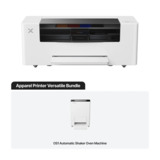
The xTool Apparel Printer Versatile Bundle is a complete DTF printing package with printer, Automatic Shaker Oven, clean...
The xTool Apparel Printer...
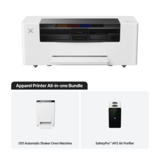
The xTool Apparel Printer All-in-1 Bundle is a complete DTF printing solution with printer, AP2 Air Purifier, Automatic ...
The xTool Apparel Printer...
- Snelle levertijden
- Gratis verzending vanaf € 100!
- Showroom in IJsselstein!

The xTool Automatic Shaker Oven Machine automates powdering and curing in DTF printing. Ensures consistent, durable tran...
The xTool Automatic Shake...
Overige categorieën in Print & Transfer
DTF Printers for Professional Clothing Printing
DTF Printers for Professional Garment Printing and Textile Personalization
With a DTF printer, you can produce professional full-color transfers for T-shirts, hoodies, sweatshirts, workwear and other textile products. DTF stands for Direct to Film, a printing process in which a design is printed onto special transfer film before being applied to fabric using a heat press.
DTF printing is particularly interesting for creative businesses, clothing brands, print shops and companies looking to personalize apparel and merchandise in-house. You can produce individual products, small batches and personalized orders on demand.
At FilRight, you can explore the xTool Apparel Printer Plus and various DTF printer bundles, as well as the xTool Automatic Shaker Oven Machine. Together, these products provide a workflow for printing, powder application, curing and heat pressing DTF transfers.
What Is DTF Printing and How Does It Work?
DTF printing is a transfer-based method for decorating textiles. Unlike DTG (Direct to Garment), the design is not printed directly onto the fabric. Instead, it is first printed onto a special PET transfer film.
The DTF process involves four main steps:
Print the design: the DTF printer applies CMYK and white ink to transfer film.
Apply adhesive powder: special DTF powder adheres to the wet ink.
Cure the transfer: controlled heat melts and cures the adhesive powder, for example using an automatic Shaker Oven.
Heat press onto fabric: the finished transfer is applied to the garment using the correct temperature, pressure and pressing time.
After pressing, the carrier film is removed according to the instructions for the transfer material.
This process enables colorful textile prints with detailed images, logos, text and illustrations.
xTool Apparel Printer Plus – A More Automated DTF Workflow
The xTool Apparel Printer Plus is designed for businesses that want to produce their own DTF transfers.
The printer uses dual Epson I1600 printheads for applying color and white ink. With a maximum print width of approximately 35.6 cm, it supports a wide range of designs for garments and accessories.
Key features of the Apparel Printer Plus include:
Full-color CMYK + white: for colorful transfers on light and dark fabrics.
Dual printheads: for processing color and white ink.
Automatic maintenance features: including printhead cleaning and white ink circulation.
Built-in humidity control: helping maintain stable conditions around the printheads.
Improved white ink system: designed to reduce the risk of clogging.
Smart monitoring: support for maintenance, printer status and alerts.
xTool software: for preparing and managing printing jobs.
The Plus version builds on the original xTool Apparel Printer with improvements to maintenance, humidity control and everyday operation.
This makes it particularly interesting for businesses producing transfers regularly and looking for an efficient printing workflow.
Which xTool DTF Printer Bundle Should You Choose?
The xTool Apparel Printer Plus is available in different configurations. The best choice depends on your existing equipment and how much of the DTF process you want to automate.
xTool Apparel Printer Plus – Standalone
The xTool Apparel Printer Plus provides the foundation for producing DTF transfers.
The printer creates full-color designs on special transfer film. To complete the process, you also need compatible adhesive powder, suitable curing equipment and a heat press.
This option is particularly suitable if you already have equipment for processing and curing DTF transfers.
xTool Apparel Printer Plus Versatile Bundle
The xTool Apparel Printer Plus Versatile Bundle combines the DTF printer with the xTool Automatic Shaker Oven Machine.
The oven automates the application and distribution of adhesive powder and the subsequent curing process, reducing the need for manual handling.
The Versatile Bundle is useful for businesses looking for a more efficient workflow when producing transfers regularly.
xTool Apparel Printer Plus All-in-1 Bundle
The xTool Apparel Printer Plus All-in-1 Bundle offers a more extensive DTF setup, combining the printer, Shaker Oven and additional air purification.
It is suitable for users who want to automate printing and curing while also considering filtration as part of their workspace setup.
Please note: a heat press is required to apply DTF transfers to garments. Always check the exact equipment and accessories included in your chosen bundle.
Automatic Shaker Oven for DTF Transfers
Even powder distribution and proper curing are important for producing reliable DTF transfers.
The xTool Automatic Shaker Oven Machine is designed to automate these processes.
After printing, the transfer film is processed through the oven system. Adhesive powder is applied, excess powder is removed and controlled heat cures the adhesive layer.
This helps prepare transfers more consistently for heat pressing.
For businesses producing apparel regularly, an automatic Shaker Oven can reduce manual work and make the workflow more efficient.
Which Fabrics Can You Print with DTF?
One of the key benefits of DTF printing is its versatility across different textiles.
With compatible transfers, you can decorate materials such as:
Cotton
Polyester
Cotton-polyester blends
Various other suitable fabrics and textile products
DTF can therefore be used on both light and dark garments.
Popular applications include personalized T-shirts, hoodies, sweatshirts, tote bags, sportswear, workwear and promotional textiles.
Actual adhesion, stretchability and wash resistance depend on the fabric, ink, transfer film, adhesive powder and heat press settings.
Always test unfamiliar materials before starting a larger production run.
DTF Printers for T-Shirts, Workwear and Merchandise
A DTF printer can be used for a wide range of commercial applications.
Custom T-shirts and hoodies
Create garments with company logos, illustrations, text or personalized designs. Full-color printing supports detailed images and color gradients.
Personalized workwear
Add logos, names and other identifying details to polo shirts, sweatshirts and compatible workwear.
Clothing brands and online stores
Produce small collections or offer print-on-demand products without having to keep large quantities of pre-printed clothing in stock.
Merchandise and promotional textiles
Create personalized apparel for events, sports clubs, schools and businesses.
Because transfers are produced separately from the garment, designs can be prepared in advance and later applied to suitable products.
What Do You Need to Start DTF Printing?
A DTF printer is an essential part of the process, but it is not the only equipment required to produce finished garments.
In addition to the xTool Apparel Printer Plus, a complete workflow uses:
DTF ink: CMYK and white ink for printing designs.
DTF transfer film: special film used as the printing surface.
DTF adhesive powder: helps bond the printed design to the fabric.
Shaker Oven or suitable curing equipment: for powder application and curing.
Heat press: transfers the design onto the garment using controlled heat and pressure.
Maintenance supplies: for cleaning and maintaining the printer.
Explore our DTF printer accessories for ink, transfer film and maintenance products.
Applying DTF Transfers with a Heat Press
Once printed and cured, a DTF transfer is ready to be applied to fabric.
A heat press uses controlled temperature and pressure to bond the transfer to the garment.
A suitable heat press helps apply consistent settings, which are important for adhesion, finish and wash resistance.
The correct temperature, time and pressure depend on the transfer materials and fabric.
Explore our Heat Presses to complete your DTF printing workflow.
Maintaining a DTF Printer
Regular maintenance is an important part of DTF printing.
White DTF ink contains pigments that can settle, making proper ink circulation and printhead care particularly important.
The xTool Apparel Printer Plus features automatic maintenance functions, an improved white ink system and built-in humidity control.
These features help maintain printer performance and reduce the risk of clogging.
However, users still need to follow recommended cleaning procedures, use compatible supplies and operate the printer under suitable environmental conditions.
Proper ventilation, workspace setup and safe handling of materials are also important during powder application, curing and heat pressing.
Buy a DTF Printer at FilRight
Looking to buy a DTF printer for your clothing brand, print shop or business? At FilRight, we help you choose the right xTool Apparel Printer Plus configuration and supporting equipment.
We consider your production volume, the fabrics you want to decorate and the level of automation required.
We can also advise on the Shaker Oven, DTF ink, transfer film, maintenance supplies and suitable heat presses.
Visit our showroom in IJsselstein or schedule a consultation. We are happy to help you build a DTF printing setup that fits your business.